
Kickstarter Board Game Pick-and-Pack Readiness: When BackerKit Exports, Add-ons, and Warehouse Pick Rules Do Not Match
A WinsBS decision guide for creators who need pick and pack fulfillment, board game kitting, pledge-manager exports, add-on lists, SKU maps, carton files, warehouse bins, and pick rules to match before outbound fulfillment starts.
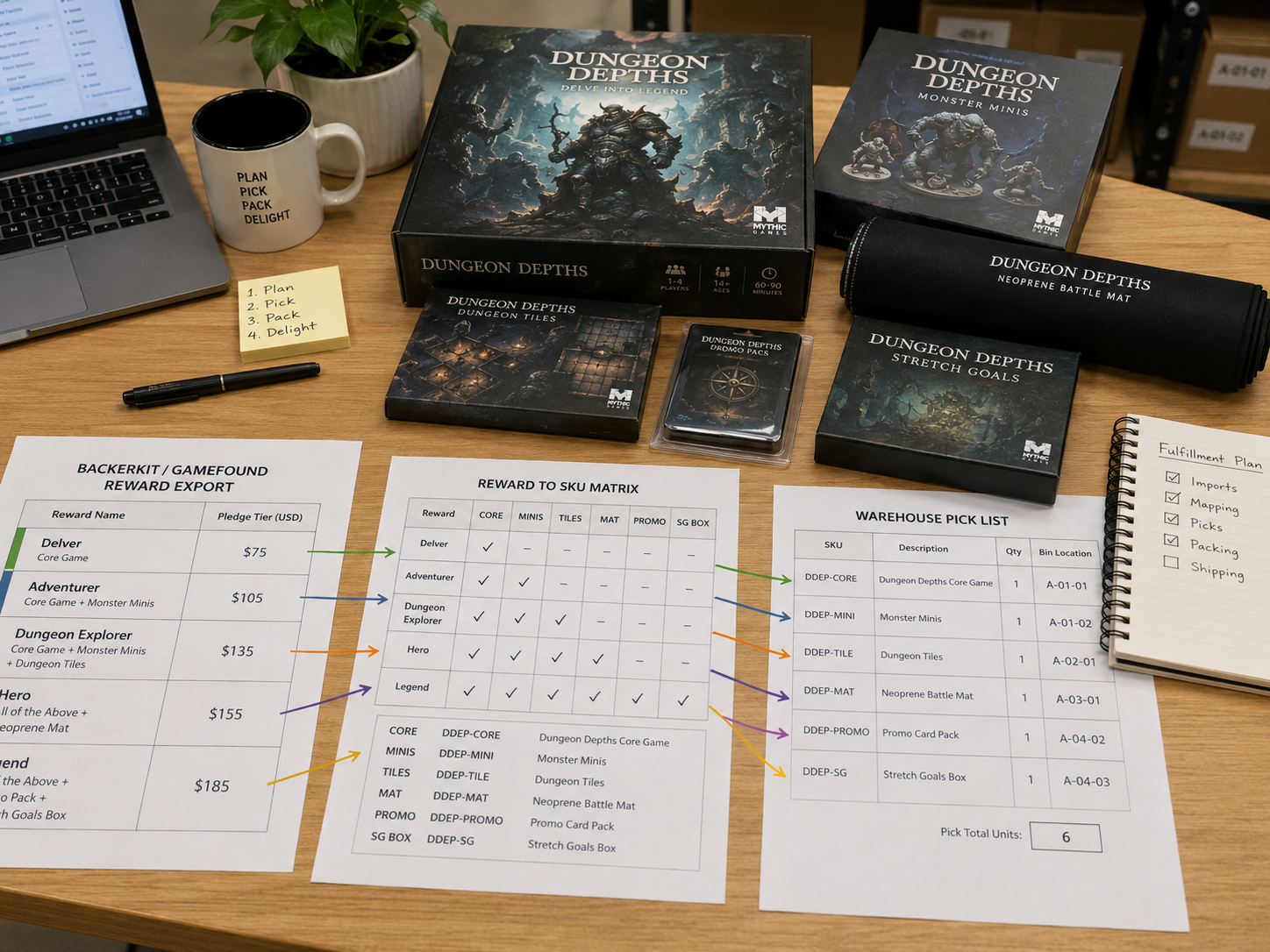
For a complex Kickstarter board game, build fulfillment from warehouse-pickable SKUs, not reward names. Use SPU or pledge names to define product families and bundle logic, then convert every BackerKit, Gamefound, or Kickstarter Pledge Manager order into SKU pick lines before labels are released.
A final export is not a final pick rule. The export becomes usable only after each pledge, paid add-on, stretch goal, kit, and replacement reserve has a clear relationship to physical SKUs, carton sources, warehouse bins, and test-picked orders.
Use this page to build the model: reward language to SPU logic, SPU logic to SKU lines, SKU lines to bins, and bins to a pick rule the warehouse can execute without chat context.
The Real Pressure Before Orders Start Shipping
The hard moment is not when the warehouse says it can pick and pack. The hard moment is when a creator has to answer what a real backer should receive: base game, miniatures box, dungeon tile pack, boss expansion, neoprene mat, metal coins, sleeves, promo cards, stretch goal box, one extra mini set, or a replacement component.
Reward names are written for backers. SKU names are written for inventory. Carton files are written for receiving. Pick rules are written for warehouse labor. If those layers are mixed together, the first shipping wave becomes the test, and backers discover the model failure through missing add-ons or duplicate expansions.
Core judgment: Use SPU for product grouping and pledge logic; use SKU for warehouse picking.
Example Campaign: Dungeon Game With Minis, Tiles, Mat, Expansion, Promo Cards, And Stretch Goals
Use a concrete campaign before building the warehouse rule. Imagine a dungeon board game with these physical pieces:
- Core Game, Dungeon Tiles Pack, Miniatures Box, Hero Upgrade Pack, Boss Expansion, Neoprene Mat, Metal Coins, Sleeves, Kickstarter Exclusive Promo Cards, Stretch Goal Box, and Late Add-on Extra Mini Set.
- Base pledge includes the Core Game. Deluxe pledge includes Core Game, Miniatures Box, and Dungeon Tiles Pack. All-in pledge includes Deluxe plus Boss Expansion, Mat, Coins, Sleeves, Promo Cards, and Stretch Goal Box.
- A backer can still buy extra add-ons. One base backer may buy a mat. One deluxe backer may buy an extra Miniatures Box. One all-in backer may buy a second Boss Expansion.
The warehouse should not be asked to pick `Deluxe Adventurer Pledge`. It should pick physical lines such as `SKU-CORE-001 x1`, `SKU-MINI-001 x1`, and `SKU-TILE-001 x1`, unless a real pre-assembled kit SKU exists.
- Backer reward language
- SPU / pledge logic
- Bundle rule
- SKU pick lines
- Carton source
- Warehouse bin
- Test pick
- Shipment label
- Backer order
The Rule: SPU Explains The Product. SKU Drives The Warehouse.
A complex board game campaign needs layers. Do not collapse all of them into the pledge-manager export.
On small screens, each row becomes a card so the layer, example, and warehouse use stay readable.
| Layer | Example | Used For | Should Warehouse Pick From This? |
|---|---|---|---|
| Reward name | Deluxe Adventurer Pledge | Backer-facing campaign promise and pledge selection. | No. Translate it before release. |
| SPU / product family | Dungeon Game System | Commercial grouping, pledge logic, reporting, and product-family planning. | Usually no. It is normally not a bin-level physical unit. |
| SKU / physical unit | SKU-MINI-001 Miniatures Box | Warehouse bins, carton files, pick rules, inventory count, and support tickets. | Yes. This is the normal pick line. |
| Bundle rule | Deluxe = Core + Minis + Tiles | Converting pledge language into multiple SKU pick lines. | No, unless it has been converted into SKU lines. |
| Kit SKU | KIT-DELUXE-001 | A pre-assembled set physically created and binned by the warehouse. | Yes, but only if the kit actually exists as pickable inventory. |
Release rule: the warehouse should pick SKU lines or real kit SKUs, not campaign language. A paid add-on must become a separate pick line unless it was intentionally pre-kitted. A stretch goal must be assigned either to every eligible order or to a specific pledge / SKU rule.
Reward-To-SKU Matrix: What The Warehouse Must Actually Pick
Build this matrix before label release. It is the translation sheet between BackerKit or Gamefound reward language and the warehouse-facing pick rule.
On small screens, each row becomes a card so you can check the pledge pattern that matches your current issue.
| Backer Selection | What Backer Sees | Paid Add-on Handling | Warehouse Pick Lines |
|---|---|---|---|
| Base Pledge | Core Game | None | SKU-CORE-001 x1 |
| Deluxe Pledge | Core + Minis + Dungeon Tiles | Do not duplicate included minis or tiles unless export shows extra quantity. | SKU-CORE-001 x1; SKU-MINI-001 x1; SKU-TILE-001 x1 |
| All-In Pledge | Deluxe + Boss Expansion + Mat + Coins + Sleeves + Promo + Stretch Goal Box | Add extra copies only when paid add-on quantity exceeds the included count. | SKU-CORE-001 x1; SKU-MINI-001 x1; SKU-TILE-001 x1; SKU-EXP-001 x1; SKU-MAT-001 x1; SKU-COIN-001 x1; SKU-SLEEVE-001 x1; SKU-PROMO-001 x1; SKU-STRETCH-001 x1 |
| Base + Paid Add-on Mat | Core Game + Neoprene Mat | Mat becomes a separate pick line because it is not included in Base. | SKU-CORE-001 x1; SKU-MAT-001 x1 |
| Deluxe + Extra Miniatures Box | Deluxe pledge plus one extra Miniatures Box | Deluxe already includes one Miniatures Box; the paid extra adds one more. | SKU-CORE-001 x1; SKU-MINI-001 x2; SKU-TILE-001 x1 |
| All-In + Extra Boss Expansion | All-in pledge plus second Boss Expansion | All-in includes one expansion; paid add-on creates a second expansion pick line. | All-in SKU lines plus SKU-EXP-001 x1 extra; total SKU-EXP-001 x2 |
Do not let the warehouse infer this from pledge names. Send the matrix with export order IDs, public item names, warehouse SKUs, carton sources, bin locations, and test-order examples.
Add-on Duplication Rules For Complex Board Game Pledges
The most expensive pick-rule mistakes usually come from included items and paid add-ons being counted together incorrectly.
Rule 1: Included Items Count First
If a pledge already includes one item, do not pick that item again unless the paid add-on quantity is greater than the included quantity. Deluxe includes one Miniatures Box. If the backer buys one extra Miniatures Box, the pick rule is `SKU-MINI-001 x2`, not x1 and not x0.
Rule 2: Paid Add-ons Become Separate Pick Lines
A Base + Mat order must show `SKU-MAT-001` as a line. Do not rely on the warehouse noticing that a mat appears in a comment field, survey answer, or add-on column that was not converted into SKU language.
Rule 3: Replacement Reserve Is Not Sellable Pick Stock
If spare boxes, component packs, or parts inventory are placed in normal pick bins, late pledges and add-on sales can consume the stock needed for damaged games, missing parts, or support promises.
Stretch Goal Handling: Do Not Leave Eligibility In Campaign Notes
Stretch goals need a physical rule before pick and pack starts. The rule depends on how the factory packed the item.
- Packed inside the Core Game: no separate pick line, but support needs to know the item is inside the core box.
- Packed as a Stretch Goal Box: create `SKU-STRETCH-001` and assign it to every eligible pledge or region.
- Packed as a small promo pack: create `SKU-PROMO-001` or a pre-kit rule, then confirm the bin is pickable.
- Region-specific stretch goal: add an order filter so the warehouse does not ship the item to the wrong region.
- Late unlock not in export: create a manual eligibility rule and test it before the affected pledge shapes release.
If the stretch goal is only described in campaign copy, the warehouse does not have a pick rule. Turn eligibility into SKU lines, kit SKUs, or a written no-pick note before labels are released.
Warehouse Test Pick: The Eight Orders To Run Before Label Release
Do not use the first live wave as the test. Before releasing labels, test-pick orders that expose the pledge logic, add-on logic, carton access, and support-facing names.
- Base only.
- Deluxe only.
- All-in only.
- Base plus one paid add-on.
- Deluxe plus a duplicate paid add-on already included once in Deluxe.
- All-in plus an extra copy of the expansion.
- Late address or order change after export cleanup.
- Replacement or damaged-component order that should draw from reserve, not sellable stock.
For each test, confirm export order ID, backer-facing reward, converted SKU lines, bin location, packed carton size and weight, shipment log output, and the item names support will use if the backer asks what shipped.
Five Wrong-Order Patterns To Diagnose Before The Main Wave
1. Deluxe backers receive duplicate expansion
Likely cause: expansion exists inside the Deluxe bundle rule and again as a paid add-on line. Fix: mark the expansion as included in Deluxe, then pick extra expansion only when quantity exceeds the included count.
2. Base + Mat add-on orders miss the mat
Likely cause: the add-on column was not converted into `SKU-MAT-001`. Fix: add the mat as a separate order line for paid mat add-ons and test a Base + Mat order before release.
3. Promo cards are missed across many orders
Likely cause: the promo was treated as a campaign note, not a pickable SKU or pre-kit rule. Fix: create `SKU-PROMO-001` or confirm that the promo is already inside the eligible pledge carton.
4. Stretch goal box is not picked
Likely cause: the Stretch Goal Box exists in cartons but was not assigned to eligible orders. Fix: add `SKU-STRETCH-001` to the pick rule for every eligible pledge shape and verify the bin location.
5. Replacement reserve is accidentally sold
Likely cause: reserve cartons were placed in normal pick bins or late pledge inventory. Fix: separate reserve stock by SKU and bin, then block it from normal outbound rules.
If the same wrong item repeats across many orders, treat it as a rule problem first. Random picker errors usually scatter. Rule errors repeat.
Where WinsBS Fits, And Where It Does Not
WinsBS is strongest when the project still needs one execution review before outbound release: the China-origin SKU and carton reality, pledge-manager export, reward-to-SKU matrix, U.S. receiving status, bin setup, and warehouse pick rules all have to describe the same order.
Execution Model Difference
A pledge manager can export orders and organize backer choices, but it cannot make warehouse bins or carton labels match those choices automatically.
A domestic warehouse can pick clear rules, but it should not be asked to decode reward names, factory item names, and changing add-on logic from scattered files.
WinsBS fits when the campaign needs pledge language converted into SKU pick lines that match China-origin carton files and U.S. warehouse bins before labels are released.
Routine domestic pick and pack, stable bins, tested pick rules, and post-fulfillment support are still basic execution work WinsBS can support. The difference is positioning: WinsBS is a stronger fit for creators who want higher-touch, customized China-to-U.S. fulfillment coordination than for teams whose only priority is the lowest possible scaled warehouse rate. If wrong shipments already reached backers, the next decision may also include replacement and post-fulfillment exception handling.
Source And Review Note
This page is a release-readiness guide, not warehouse pricing advice or platform UI support. It uses public workflow context from Stonemaier's shipping and fulfillment hub, pledge-manager shipping logic from BackerKit shipping options, and final fulfillment timing context from Kickstarter's pledge-manager guidance.
The WinsBS review layer applies those public workflow patterns to a narrower operating question: can the final export be converted into SKU pick lines that match the SKU map, carton file, warehouse bins, and tested pick rule?
FAQ
What is pick and pack fulfillment for a Kickstarter board game?
It is the warehouse process of turning each backer order into the correct physical shipment. For board games, that can include base games, deluxe editions, expansions, mats, minis, promo items, stretch goals, and paid add-ons.
Should a warehouse pick by reward name or SKU?
The warehouse should pick by SKU lines or real kit SKUs, not reward names. Reward names and SPUs can define pledge logic, but they must be translated into physical SKUs, bin locations, carton sources, and tested pick rules before labels are released.
Why do Kickstarter board game add-ons ship wrong?
Add-ons often ship wrong when included pledge items and paid add-on quantities are not converted into SKU pick lines. For example, a Deluxe pledge that already includes one Miniatures Box needs a clear rule for whether a paid add-on creates a second Miniatures Box pick line.
Is a BackerKit or Gamefound export enough for the warehouse?
No. The export is a starting point. The warehouse still needs the export translated into SKU names, bin locations, kitting rules, carton sources, and sample orders that prove the rule works.
When should creators pause pick and pack release?
Pause release when reward names have not been translated into SKU lines, when add-on quantities are unclear, when stretch goal eligibility is still in campaign notes, when reserve stock is mixed with sellable inventory, or when representative sample orders have not been test-picked.
How does China-to-U.S. fulfillment make pick and pack harder?
The physical inventory is usually defined in China through factory SKU names, carton files, and packing lists, while the U.S. warehouse works from bins and pick rules. If those two systems are not matched before release, errors appear during outbound fulfillment.
What files should I check before releasing outbound labels?
Check the pledge-manager export, reward-to-SKU matrix, add-on list, stretch goal or promo list, SKU map, factory packing list, carton file, carton labels, warehouse bin setup, pick rules, and sample orders.
Can WinsBS review my BackerKit or Gamefound export before label release?
Yes. WinsBS can review the export against the reward-to-SKU matrix, SKU map, add-on list, carton file, warehouse bins, pick rules, and sample orders to identify whether labels should be released, held for affected pledge shapes, or corrected before outbound fulfillment starts.
Methodology
Keyword basis: this page uses the local 2026-05-08 keyword research archive, which showed strong demand around pick and pack, pick-and-pack services, kitting fulfillment, warehouse kitting, crowdfunding fulfillment, and Kickstarter fulfillment.
Source basis: the article uses repository source-library notes and local WinsBS sibling pages for pre-departure file readiness, warehouse-speed limits, shipping-fee readiness, and replacement handling. The public source links above provide the platform and tabletop workflow context.
Operational judgment: the recommendation is built around recurring board game fulfillment failure patterns: reward names used as pick rules, included items duplicated as add-ons, stretch goals left in campaign notes, untested sample orders, and reserve stock mixed with sellable inventory. No invented error rates, transit-time claims, or customer metrics are used.
Send Your Pick-And-Pack Files For Review
Send WinsBS the files before outbound labels are released, not after the first wrong add-on turns into a support thread. The review question is simple: has every backer-facing reward been converted into warehouse-pickable SKU lines?
WinsBS will review whether your export, reward-to-SKU matrix, SKU map, carton file, bin setup, and pick rules support full label release, partial hold, sample-order testing, wave separation, or rule correction before outbound fulfillment starts.
Best Files To Start With
- Pledge-manager export
- Reward-to-SKU matrix
- Add-on list
- Stretch goal or promo item list
- SKU map
Warehouse Files
- Carton file
- Carton labels
- Warehouse bin setup
- Warehouse pick rules
- Sample orders
If Errors Already Started
- Shipment log
- Wrong-shipment examples
- Support ticket examples
- Exception log if available
- Current hold / resend rule
Your order exports, SKU files, warehouse rules, and support examples are reviewed only for the requested fulfillment-readiness check. If your team requires an NDA before sharing sensitive files, request that before sending documents.